

Today you will be able to combine your three images into one image.
Step 1: Open up lightroom and import the three photos of one object taken at three different angles.
Step 2: Select the images by hitting CTRL+ Click with your keyboard and mouse.
Step 3: Right Click on the three images and select Edit/Open as Layers in Photoshop.
Step 4: Photoshop will open up all three images into one composition.
Step 5: Strong will show you how to rotate and resize the images.
Step 6: When done save in Photoshop and close Photoshop.
Step 7: Strong will show you how to export your photo in Lightroom.
Go to File/Export
Change the settings so that your photo is saved
- To your F: Drive.
- As your Last Name Angles.jpg
- Width of 2000 pixels and Height of 2000 pixels
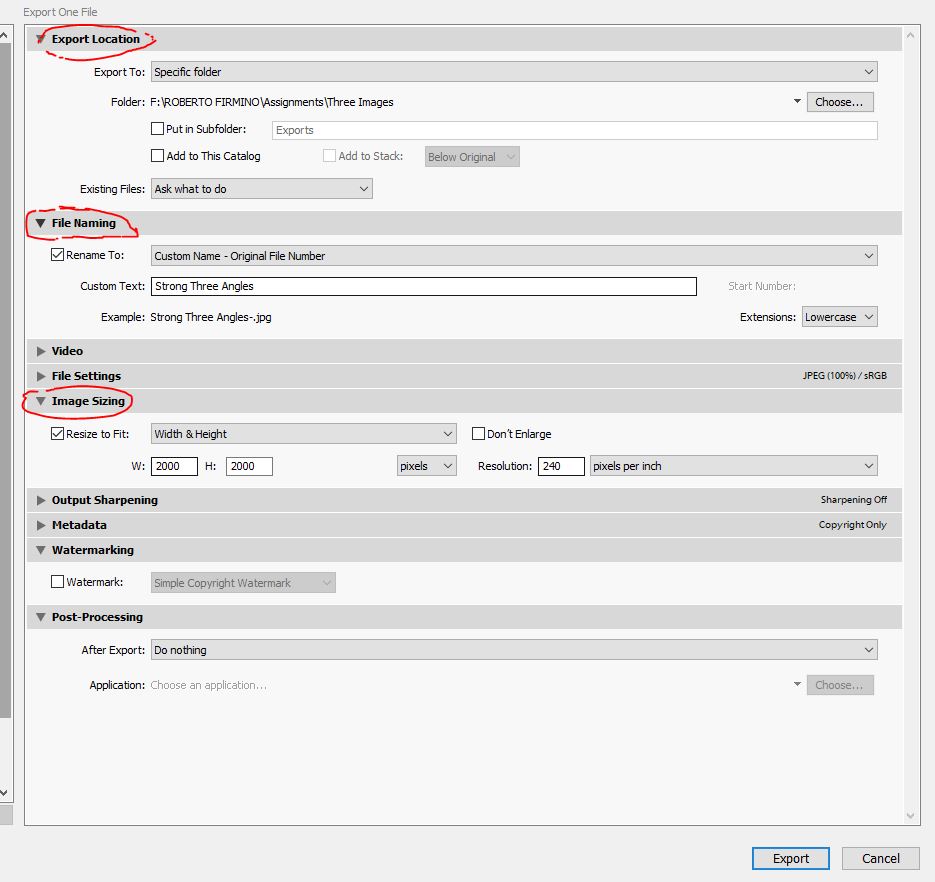
Then it “Export” + Upload to Google Classroom

