

For this week’s photo challenge, we will be using a fast shutter speed in order to freeze a fast moving object or person. We will then take the final image into photoshop and duplicate the image, laying one next to the other, see above for an example
To do this, we will need to shoot with a fast shutter speed. Looking at the histogram in Lightroom we see how the student used a fast shutter speed in order to capture this image.
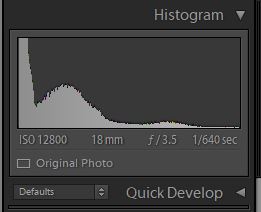
For this photo, the photographer used a shutter speed of 1/640. Using a slower shutter speed would have resulted in an image that has motion blur. Which is when a part of the subject is blurred out because the shutter speed was not fast enough to capture the person or object.
How you will do it.
- Take a practice photo, where you demonstrate freezing a fast moving object or person.
- Post it to your visual journal. Write a reflection about what you could do to improve this photograph? About which photo would look good placed side by side by the same photograph? What subject would look good with a duplicate facing the opposite direction?
- Take the photo.
- Edit it in Lightroom or Photoshop.
- Brightness Contrast
- Details/Sharpen
- Details/Noise Reduction
- Clarity
- Color or Black and White?
- Cropped?
- Straightened?
- Make a virtual copy in Lightroom. Rotate one image so it is facing the opposite direction.
- Open up both images in Lightroom.
- Crop the image and expand the work area.
- slide one photo next to the other.
- Export the photo from Lighroom using these settings

TWO Photos are due on 10/2
- One practice photo demonstrating you can freeze motion with fast shutter speed.
- One final photo that demonstrates slow shutter speed AND has a symmetrical mirror image like the one in the above example.
What I’m grading you on:
- Image is in focus.
- Image is well edited, see above for checklist.
- Image has a symmetrical image next to it. See example.
- Subject is a fast moving object or person frozen with a fast shutter speed.
 Strong Photography 19-20