

To Do List for 2/14

Closeup image of notepad with pen.

Learning objectives:

  • I know a few editing techniques in Adobe Lightroom.
  • I can make and edit my first slow shutter speed photos.

Step by Step:

  1. Check out Today’s Warm Up: Editing Tips in Lightroom.
  2. Make your first slow shutter speed image from one of the sketches you made this week.
  3. Take the images into Lightroom, then edit them using the techniques you learned about earlier today.
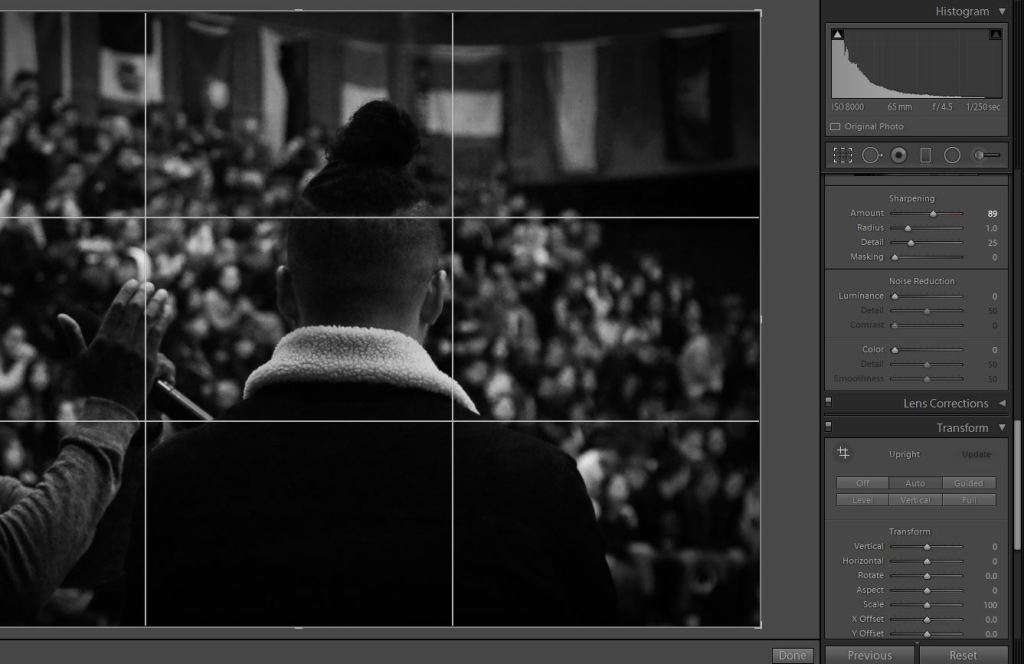
Today’s Warm Up: Editing Tips in Lightroom.

A photo I took at the Multicultural Assembly a few weeks back.

Read the article on this link: https://www.digitalphotomentor.com/7-simple-lightroom-tips-improve-photos/, fire up your Visual Journal, and answer these brief questions.

What are the basic editing techniques discussed in these images?

Which technique will be most useful to you for your fun with slow shutter photo?

Which technique is shown on the lower right hand corner of the image I posted that is mentioned in the article?

Post these answers to your visual journal. Save the most useful screenshot from the website to your visual journal.

Design a site like this with WordPress.com
Get started