

To Do List for 2/12

Closeup image of notepad with pen.

Learning objectives:

  • I can correctly identify how to change Aperture, Shutter Speed and ISO on Canon DSLR cameras.
  • I understand the requirements of the new photo challenge, Fun with Slow Shutter Speed
  • I can sketch out an idea for slow shutter speed.

Step by Step:

  1. Check out Today’s Warm Up: Review Exposure Triangle.
  2. Sketch out two ideas for slow shutter speed using the colored pencils and sketchpads.
  3. Make two photos out of those sketches.
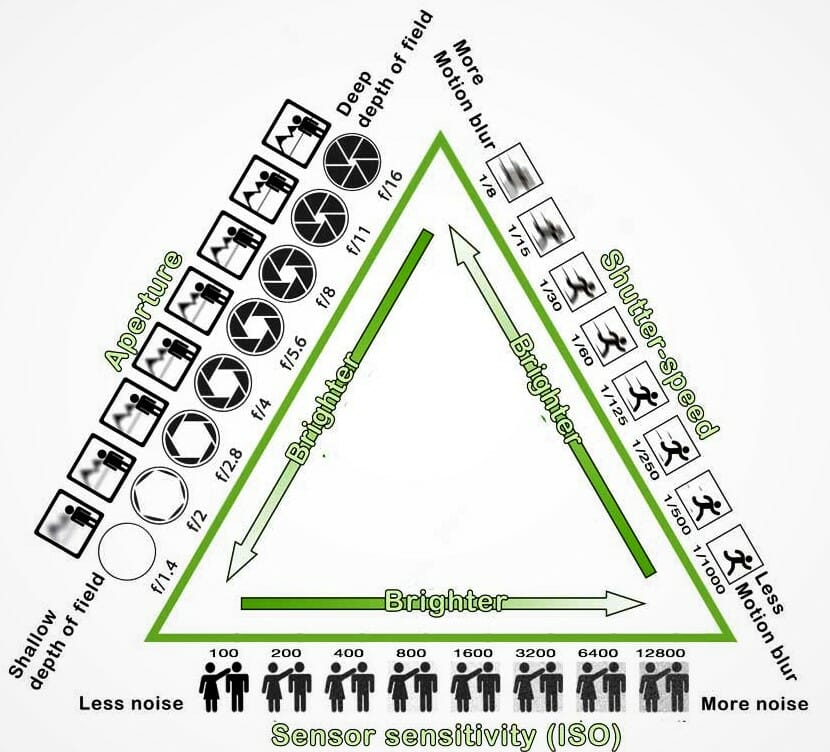
Today’s Warm Up: Exposure Triangle

Use the M Mode:

  • To adjust Shutter speed: Wheel on top of camera.
  • To adjust ISO (Light Sensitivity): Press ISO button on top of camera.
  • To adjust Aperture: wheel that says ‘Set’ in the Middle

Look at the drawing up at the top of the screen and the notes on how to change Shutter Speed, Aperture and ISO.

Answer the following questions on your visual Journal.

What Mode do you need to be in when shooting to adjust Aperture, Shutter Speed, & ISO.

What sort of shutter speed do you need to be at in order to create a slow shutter speed image?

What sort of ISO do you want to shoot at for light painting?

What sort of Aperture do we need for slow shutter speed, so that there isn’t too much light coming into the camera?

Design a site like this with WordPress.com
Get started